- What is Website Accessibility
- Website Accessibility Standards
- Essential Features of an Accessible Website
- Common Website Accessibility Problems and How to Fix Them
- Website Accessibility Best Practices
- Website Accessibility Testing Tools and Methods
- Website Accessibility and SEO: How They Work Together
- When Should You Hire Website Accessibility Experts?
- Watch: How We Helped a Local Brand Grow
- FAQs – Website Accessibility
Quick Answer
Website accessibility means designing a site so it works for everyone, including people using screen readers, keyboard-only navigation, or other assistive technology. The practical target for most businesses is WCAG 2.1 or 2.2 Level AA, which reduces legal risk and often improves SEO at the same time.
Millions of people navigate websites using keyboard-only input, voice commands, screen readers, or assistive technology to navigate a website.
When a site isn’t built around being accessible, then you’re not just missing an audience; you’re opening doors to legal complaints, too. This is why it is important to ensure your site works for everyone visiting it.
This guide walks through what accessibility means, why it matters for your business, the standards you need to know, and practical steps to fix the most common problems — so you can build (or update) a site that’s inclusive by design.
What is Website Accessibility
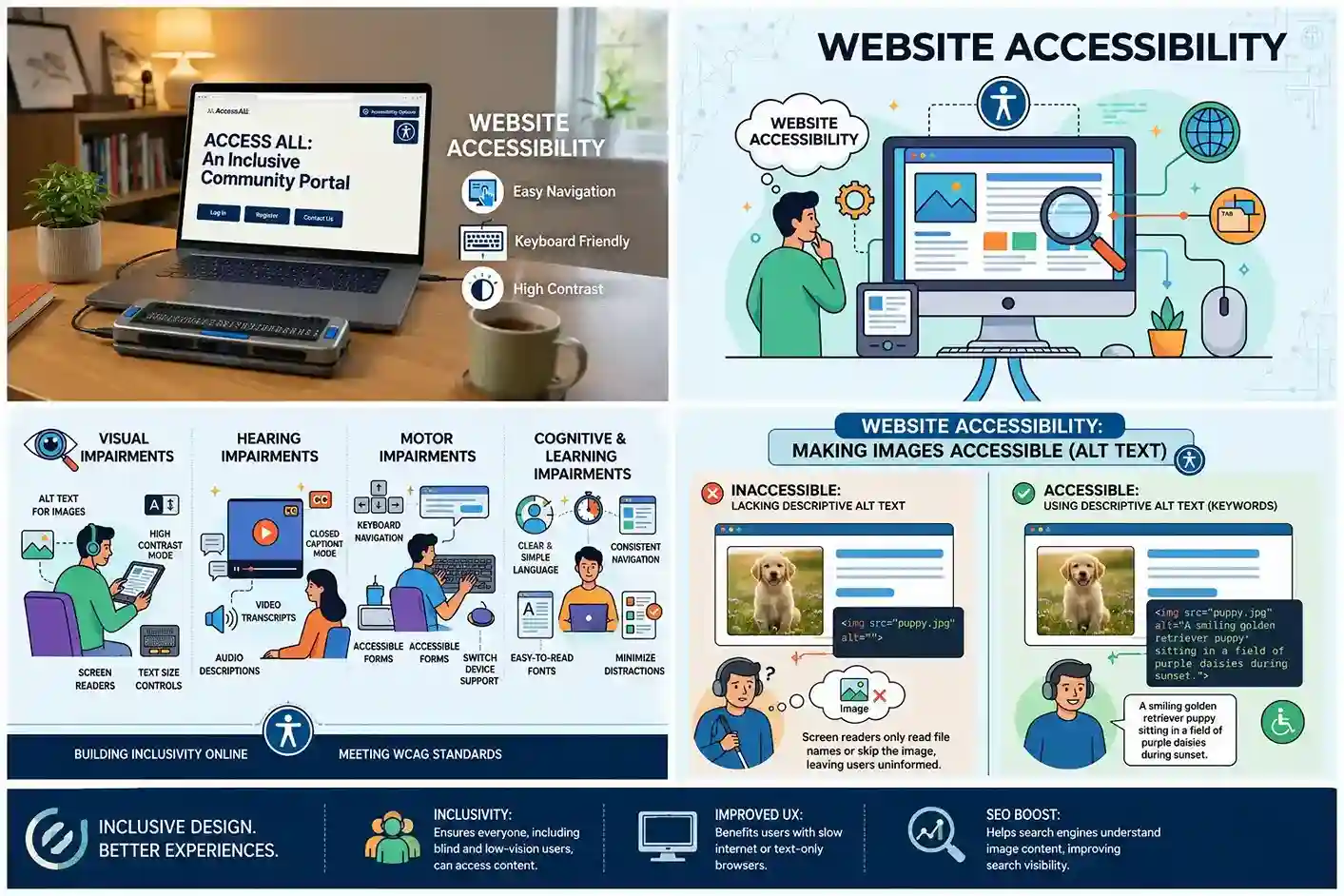
Website accessibility means designing your site in a way that works well for everyone, including people with disabilities.
Such as visual impairments who rely on screen readers, people with motor impairments who navigate by keyboard instead of a mouse, people with hearing loss who need captions on video content, and people with cognitive disabilities who benefit from clear, predictable layouts.
To make a site accessible, we need to remove the barriers that would otherwise block these users out. Such barriers can be images with no alt text, buttons that only work with a mouse click, or low color contrast that makes text unreadable.
At its core, website accessibility is about making sure no one is left out simply because of the way they interact with a screen. This connects directly to our guide on mobile-friendly web design, since accessible layouts benefit every device.
Website Accessibility Standards
The following frameworks show up constantly when talking about website accessibility, and it is worth knowing how they differ.
WCAG (Web Content Accessibility Guidelines) is the technical standard most other regulations point back to. It’s organized into three conformance levels:
- Level A: the bare minimum
- Level AA: the standard most businesses aim for, and the benchmark referenced in most legal cases
- Level AAA: the most stringent, not required for most general websites
ADA (Americans with Disabilities Act) doesn’t explicitly mention websites, but courts have increasingly interpreted it to apply to them, meaning businesses can face ADA-related lawsuits over inaccessible sites, even without a website-specific law on the books.
Section 508 applies specifically to federal agencies and organizations receiving federal funding, requiring their digital content to meet defined accessibility standards.
For most businesses, the practical target is WCAG 2.1 or 2.2, Level AA; it satisfies ADA expectations and covers the vast majority of real-world accessibility needs.
Essential Features of an Accessible Website
A handful of core elements make up the backbone of any accessible site:
- Alt text on all meaningful images, so screen readers can describe visual content
- Keyboard navigation for every interactive element — menus, forms, buttons — with no mouse required
- Sufficient color contrast between text and background, meeting WCAG minimums
- Captions and transcripts for video and audio content
- Semantic HTML (proper use of headings, lists, and landmarks) so assistive tech can interpret page structure correctly
- Visible focus indicators so keyboard users can see where they are on the page
- Clear form labels tied directly to their input fields, with helpful error messages
None of these require a full rebuild; most can be layered into an existing site through targeted fixes, similar to the approach in our website redesign checklist.
Make Your Website Fully Accessible
Fix accessibility gaps without rebuilding your entire site.
Common Website Accessibility Problems and How to Fix Them
Most website accessibility problems fall under repeated offenses. Here’s what they are and how you can resolve them:
| Problem | Why It’s an Issue | The Fix |
| Missing alt text | Screen readers can’t describe images to visually impaired users | Add descriptive alt text to every meaningful image |
| Low color contrast | Text becomes unreadable for users with low vision or color blindness | Adjust colors to meet WCAG AA contrast ratios |
| Keyboard traps | Users get stuck and can’t tab past a menu or widget | Test full keyboard navigation and fix focus flow |
| Unlabeled form fields | Screen reader users can’t tell what a field is asking for | Pair every input with a clear, programmatically linked label |
| Missing video captions | Deaf and hard-of-hearing users lose access to content | Add captions and transcripts to all video/audio |
| Non-semantic HTML | Assistive tech misreads page structure | Use proper heading hierarchy and semantic tags |
| No visible focus state | Keyboard users lose track of their position on the page | Add clear, visible focus outlines |
| Auto-playing media | Disorienting for users with cognitive or attention-related disabilities | Give users control to pause, stop, or mute |
Website Accessibility Best Practices
Fixing existing problems is one half of the equation. Building accessibility into your process from the start is the other:
- Design with accessibility in mind from day one. It’s far cheaper than retrofitting later
- Use semantic HTML by default, not just when accessibility comes up
- Run accessibility checks at every major site update, not just once a year
- Write alt text as you upload images, not as a cleanup task later
- Test with real assistive technology, not just automated scanners
- Train your content team on accessible writing and formatting habits
- Treat accessibility as ongoing maintenance, similar to security or performance, much like our approach to website security basics
Businesses that build these habits into their regular workflow spend far less time firefighting compliance issues down the line.
Website Accessibility Testing Tools and Methods
Testing accessibility properly means combining automated tools with real human review, neither one alone catches everything.
Automated tools are a good first pass:
- WAVE: visual overlay that flags issues directly on the page
- axe DevTools: browser extension for in-depth scans
- Lighthouse: built into Chrome DevTools, gives a quick accessibility score
These catch a lot, but automated scanners typically only flag a fraction of real accessibility errors; things like logical reading order or meaningful alt text still need a human eye.
Manual testing fills the gap:
- Navigate the entire site using only a keyboard
- Test with a screen reader (VoiceOver, NVDA, or JAWS)
- Zoom the page to 200% and check that layout still holds up
- Review with an actual accessibility checklist, not just a scanner report
The most reliable approach pairs automated tools for speed with manual testing for accuracy — running both regularly, not just once.
Website Accessibility and SEO: How They Work Together
Accessibility and SEO overlap more than most people realize, because both are ultimately about making content easy to find, parse, and understand for humans and machines alike.
- Alt text helps screen readers and helps search engines understand image content
- Semantic HTML and heading structure improve both assistive tech navigation and search engine crawlability
- Clear site structure benefits users navigating by keyboard and search bots crawling your pages
- Fast, lightweight pages help users with cognitive or motor impairments and improve Core Web Vitals rankings, the same fundamentals we cover in website speed and SEO
- Descriptive link text (“view our pricing guide” vs. “click here”) helps screen reader users and gives search engines more context
In short: an accessible site is very often a more SEO-friendly site. Investing in one strengthens the other. Pairing this with a broader white label SEO strategy helps agencies deliver both for their clients.
Boost SEO with Accessibility Fixes
Improve rankings and reach more users with one strategy.
When Should You Hire Website Accessibility Experts?
DIY fixes work for small, isolated issues, but there are moments where bringing in specialists makes sense:
- You’ve received a legal complaint or demand letter
- Your site is large, complex, or e-commerce-heavy
- You need a full WCAG audit, not just spot fixes
- Your team lacks the bandwidth for ongoing accessibility maintenance
- You operate in a high-scrutiny industry (healthcare, finance, education, government-adjacent)
An accessibility expert can run a full audit, prioritize fixes by risk and impact, and help build accessibility into your team’s ongoing workflow so it’s not a one-time scramble every time a new law or lawsuit makes headlines.
Get a Professional Accessibility Audit
Reduce legal risk with an expert WCAG compliance review.
Watch: How We Helped a Local Brand Grow
Hear how Top Branding Altimeter helped a nationwide handyman company boost its online visibility through better technical and accessible site foundations.
FAQs – Website Accessibility
Is website accessibility legally required?
It depends on your location and industry, but ADA-related lawsuits over inaccessible websites have become increasingly common in the U.S., regardless of company size. Meeting WCAG 2.1 AA is the most widely accepted way to reduce that legal exposure.
How much does it cost to make a website accessible?
Costs vary widely based on site size and how many issues exist. A small site with minor fixes may take a few hours of work, while a full audit and remediation on a large e-commerce site can be a much bigger investment.
Does accessibility apply to mobile sites too?
Yes, mobile accessibility follows the same WCAG principles, covering things like touch target size, screen reader compatibility, and readable text at various zoom levels.
What’s the difference between WCAG levels A, AA, and AAA?
Level A covers the most basic accessibility requirements, AA is the standard most businesses target and the benchmark used in most legal cases, and AAA is the most stringent level, typically reserved for specialized use cases.
Website accessibility isn’t a one-time checklist; it’s an ongoing commitment that pays off in fewer legal risks, a wider audience, and often, better SEO performance too.
If your site needs a professional accessibility review, our professionals at Top Branding Altimeter can help you find and fix the gaps before they become a bigger problem – contact us now.
You Might Also Find Helpful
- Web Design & Development Services — accessibility built into every new site we develop.
- Shopify Store Development — accessible e-commerce experiences for online stores.
- Social Media Marketing Packages — reach a wider audience once your site is accessible.
- Google Ads for Doctors — for medical practices needing both accessibility and visibility.
- Web Design in New York City — local web design support if you’re NYC-based.
- Web Development in Los Angeles — local web development support if you’re LA-based.
Ready to Grow Your Business?
Get expert guidance tailored to your brand — completely free consultation
Get Free Consultation